Introduction to Python and Microcontrollers
Button and LED On and Off Switch
Toggle an LED on and off with a push button — press once to turn ON, press again to turn OFF. Unlike Project 2.1, the LED state persists after releasing the button.
Uses the same components and circuit as Project 3
New Concepts
- debouncing
- functions
Concept: Debouncing
When a push button is pressed or released, the mechanical contacts briefly bounce — rapidly switching between connected and disconnected many times before settling. This is invisible to humans but causes a microcontroller to register multiple presses in one action.
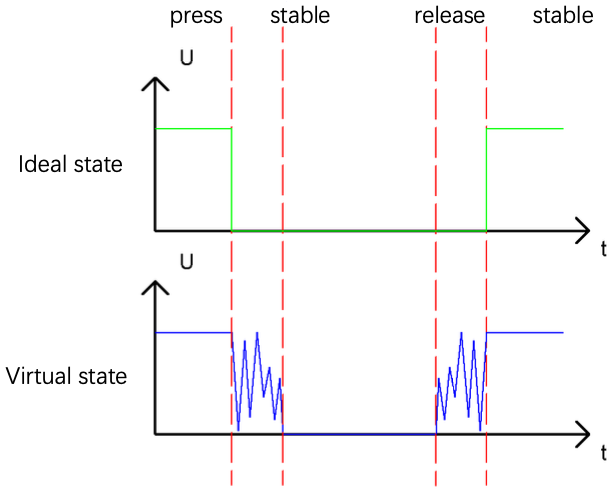
Solution: After detecting a press, wait 20ms and check again. If still pressed, treat it as a genuine button press. This filters out the noise from bouncing.
Concept: Functions
A function encapsulates code so it can be used multiple times using just the function name. It also makes code easier to read and understand.
Defining a function
def reverseGPIO():
    if led.value():
        led.value(0)
    else:
        led.value(1)
Calling a function
reverseGPIO()
Component List & Circuit Diagram
Circuit and components are identical to Project 1.3
Code
File: 01_first_examples/code/ButtonAndLed_OnOffSwitch.py
import time
from machine import Pin

led = Pin(2, Pin.OUT)
button = Pin(13, Pin.IN, Pin.PULL_UP)

def reverseGPIO():
    if led.value():
        led.value(0)
    else:
        led.value(1)

while True:
    if not button.value():          # button pressed?
        time.sleep_ms(20)           # wait 20ms (debounce)
        if not button.value():      # still pressed? (genuine press)
            reverseGPIO()           # toggle LED
            while not button.value():   # wait for release
                time.sleep_ms(20)
How to Run
Online
- Open Thonny →
01_first_examples/code/. - Double-click
ButtonAndLed_OnOffSwitch.py. - Click Run current script.
- Press the button — LED toggles ON/OFF with each press.
Code Explanation
Toggle function
def reverseGPIO():
    if led.value():
        led.value(0)
    else:
        led.value(1)
Reads the current LED state and sets it to the opposite — ON becomes OFF, OFF becomes ON.
Debounce logic
if not button.value():        # 1. initial press detected
    time.sleep_ms(20)         # 2. wait 20ms
    if not button.value():    # 3. confirm still pressed
        reverseGPIO()         # 4. toggle
        while not button.value():  # 5. wait until released
            time.sleep_ms(20)
Step 5 prevents the LED from toggling again while the button is held down — the action fires once per press, not continuously.
Key Concepts
- Debouncing: ignoring the brief noise when a button transitions state
- Toggle pattern: reading current state and setting its inverse
- Defining functions with
defin MicroPython - Waiting for release: important to avoid registering a single press as multiple events
Further Exploration
- Rename the
reverseGPIObutton to something more descriptive. For exampletoggleLED.
Adapted from Python_Tutorial.pdf Project 2.2