Introduction to Python and Microcontrollers
LED Pixel
Control a Freenove 8 RGB LED Module (WS2812 “NeoPixel” LEDs) using only a single GPIO pin, cycling each of the 8 LEDs through red, green, blue, white, and off.
New Concepts
- Addressable RGB LEDs (WS2812 / NeoPixel)
- The
neopixelmodule
Freenove 8 RGB LED Module
The module packs 8 WS2812 LEDs, each with its own red, green, and blue element (256 brightness levels per color — 16,777,216 possible colors per LED). Unlike a standard RGB LED, each WS2812 only needs a single data pin: it reads its own color data from the signal, then passes the rest down the line to the next LED. This lets multiple modules be chained by connecting one module’s OUT to the next module’s IN, controlling 8, 16, 24… LEDs from a single GPIO pin.
neopixel module
This module helps you control the Freenove 8 RGB LED Module. See reference/Class_neopixel.md for documentation on this module.
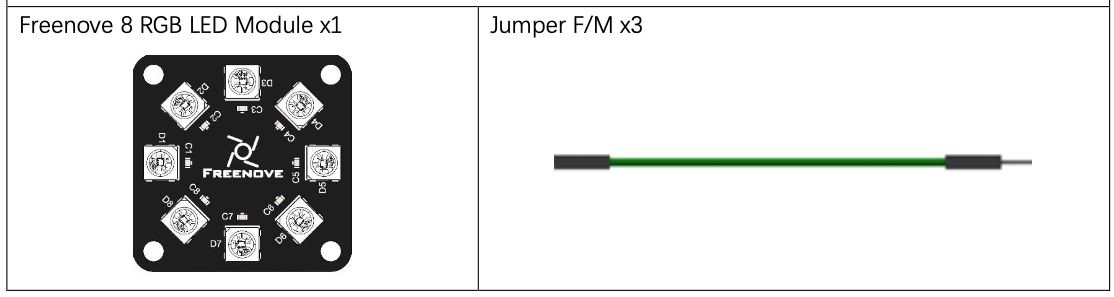
Component List
Circuit
Wiring Diagram
Disconnect all power before building the circuit. Reconnect once verified.
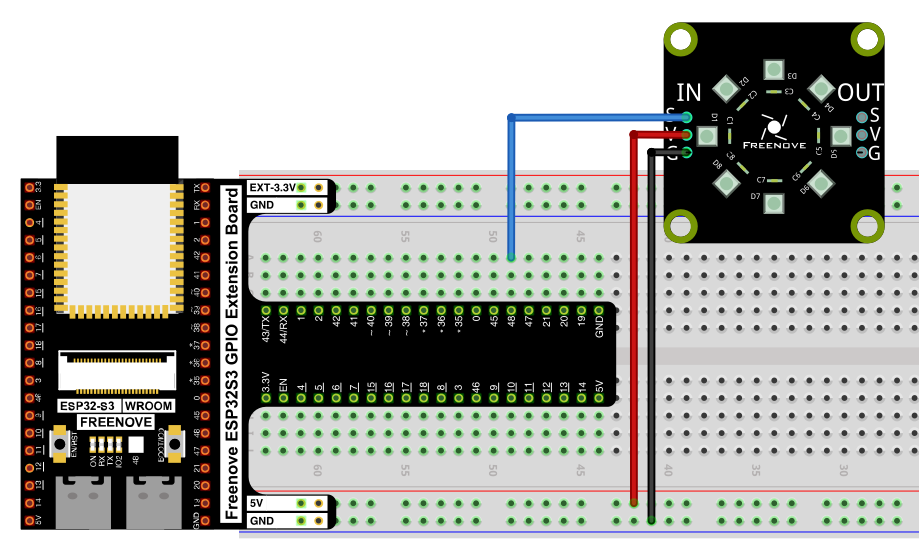
Connections:
- Module
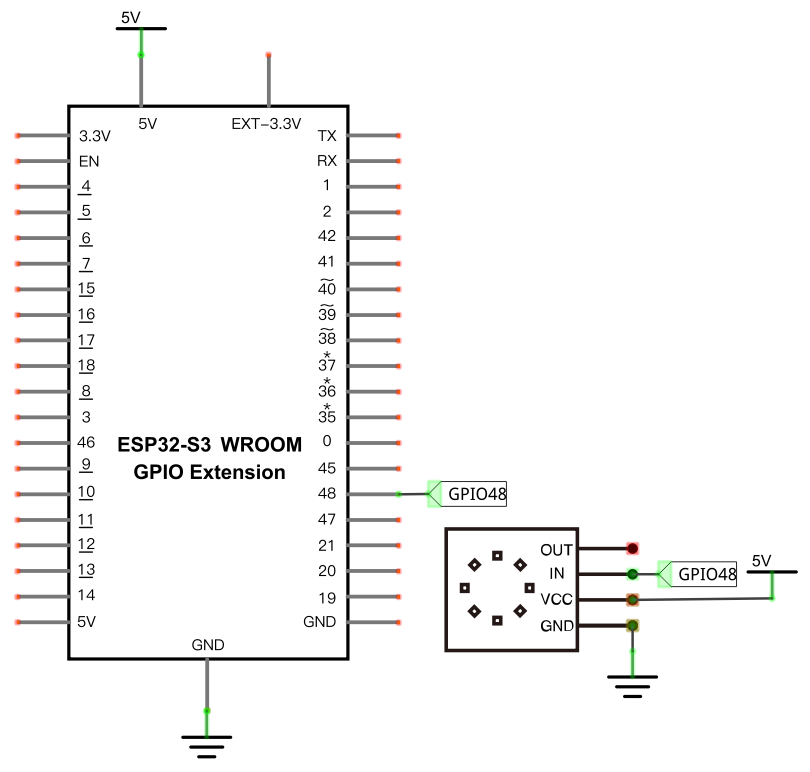
INside:S→ GPIO48,V→ 5V,G→ GND
Schematic Diagram
Code
File: 02_input_and_output/code/Neopixel.py
from machine import Pin
import neopixel
import time
pin = Pin(48, Pin.OUT)
np = neopixel.NeoPixel(pin, 8)

#brightness :0-255
brightness=10
colors=[[brightness,0,0],                    #red
        [0,brightness,0],                    #green
        [0,0,brightness],                    #blue
        [brightness,brightness,brightness],  #white
        [0,0,0]]                             #close

while True:
    for i in range(0,5):
        for j in range(0,8):
            np[j]=colors[i]
            np.write()
            time.sleep_ms(50)
        time.sleep_ms(500)
    time.sleep_ms(500)
How to Run
Online
- Open Thonny →
02_input_and_output/code/. - Double-click
Neopixel.py. - Click Run current script — all 8 LEDs cycle through red, green, blue, white, then off.
Code Explanation
Set up the module
pin = Pin(48, Pin.OUT)
np = neopixel.NeoPixel(pin, 8)
Associates GPIO48 with a NeoPixel object controlling 8 LEDs.
Define brightness and colors
brightness=10
colors=[[brightness,0,0],
        [0,brightness,0],
        [0,0,brightness],
        [brightness,brightness,brightness],
        [0,0,0]]
Each entry in colors is an [R, G, B] triple. brightness (0–255) scales how bright each color appears.
Apply a color to every LED
for i in range(0,5):
    for j in range(0,8):
        np[j]=colors[i]
        np.write()
        time.sleep_ms(50)
    time.sleep_ms(500)
The outer loop steps through the 5 colors. The inner loop assigns that color to each of the 8 LEDs in the np array — but nothing happens on the physical module until np.write() sends the array data down the line.
Key Concepts
- Addressable LEDs: each WS2812 LED stores and forwards its own color data, so a whole chain can be driven from one GPIO pin
np[j] = [r,g,b]: stages a color for LEDjwithout sending it yetnp.write(): sends the staged color data to the physical LEDs
See Class neopixel for the full API reference.
Further Exploration
- Change
brightnessto make the cycle dimmer or brighter. - Add more colors to the
colorslist (e.g. purple, orange).
Adapted from Python_Tutorial.pdf Project 6.1