Introduction to Python and Microcontrollers
Matrix Keypad
Read key presses from a 4×4 matrix keypad and print each key’s value to the Shell.
New Concepts
- Row/Column multiplexing. Used to scan the matrix keypad
4×4 Matrix Keypad
A keypad matrix is a device that integrates a number of keys in one package. As is shown below, a 4x4 keypad matrix integrates 16 keys:
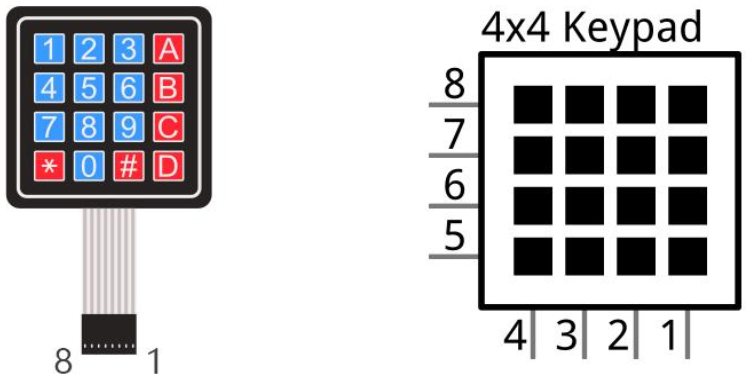
The 4x4 keypad matrix has each row of keys connected with one pin and this is the same for the columns. Such efficient connections reduce the number of processor ports required. The internal circuit of the Keypad Matrix is shown below
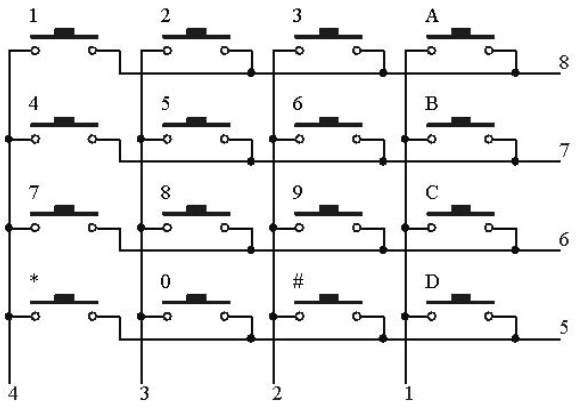
Use a row or column scanning method to detect the state of each key’s position by column and row. Take column scanning method as an example, send low level to the first 1 column (Pin1), detect level state of row 5, 6, 7, 8 to judge whether the key A, B, C, D are pressed. Then send low level to column 2, 3, 4 in turn to detect whether other keys are pressed. Therefore, you can get the state of 16 keys with only 8 wires.
The keypad.py module handles all scanning logic automatically — you just call .scan() in a loop and it returns the key character (or None if nothing is pressed).
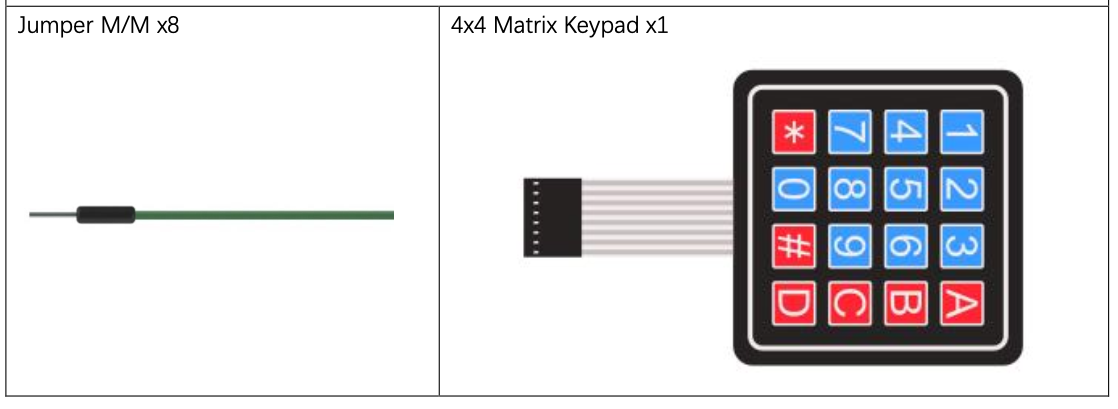
Component List
Circuit
Wiring Diagram
Disconnect all power before building the circuit. Reconnect once verified.
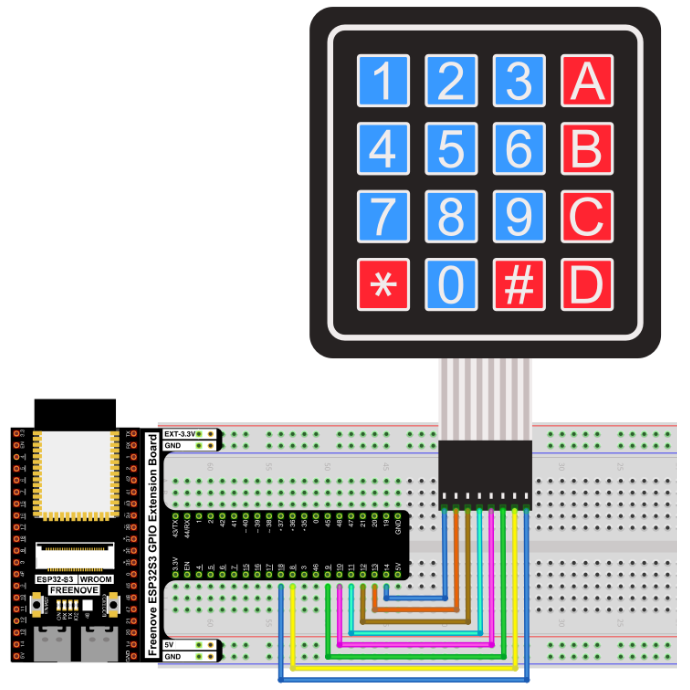
Connections:
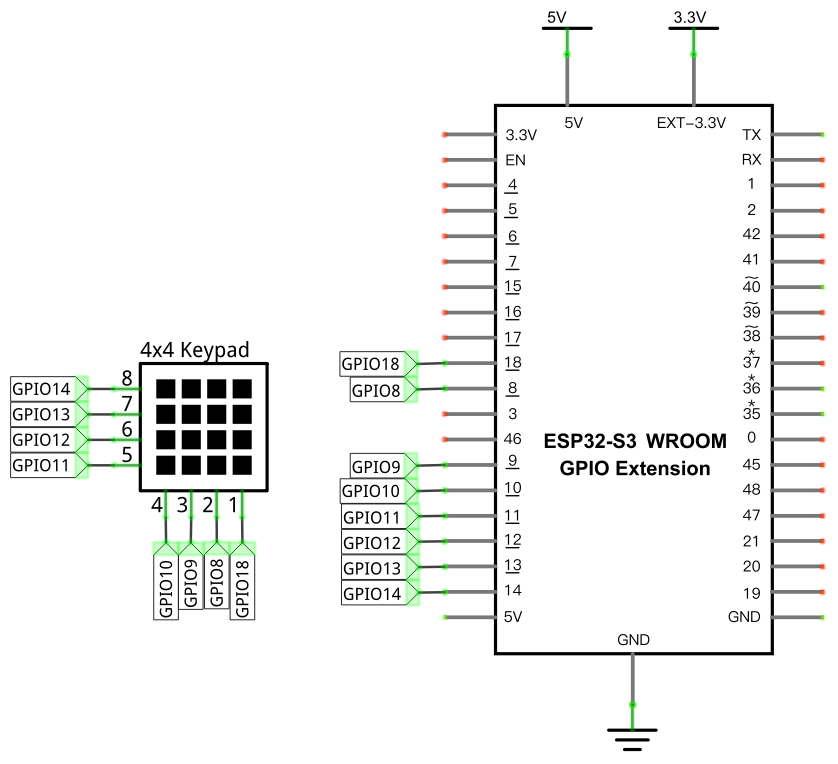
| Keypad Pin | ESP32-S3 GPIO |
|---|---|
| Row 1 | GPIO14 |
| Row 2 | GPIO13 |
| Row 3 | GPIO12 |
| Row 4 | GPIO11 |
| Col 1 | GPIO10 |
| Col 2 | GPIO9 |
| Col 3 | GPIO8 |
| Col 4 | GPIO18 |
Schematic Diagram
Code
Upload keypad.py to the ESP32-S3 before running: in Thonny, right-click keypad.py → Upload to /.
File: 03_sensors/code/Matrix_Keypad.py
from keypad import KeyPad
import time

keyPad=KeyPad(14,13,12,11,10,9,8,18)

def key():
    keyvalue=keyPad.scan()
    if keyvalue!= None:
        print(keyvalue)
        time.sleep_ms(300)
    return keyvalue

while True:
    key()
How to Run
Online
- Open Thonny →
03_sensors/code/. - Right-click
keypad.py→ Upload to / — wait for the upload to complete. - Double-click
Matrix_Keypad.py. - Click Run current script. Press any key on the keypad — the key’s character appears in the Shell.
Code Explanation
Import and initialize the keypad
from keypad import KeyPad

keyPad=KeyPad(14,13,12,11,10,9,8,18)
KeyPad takes 8 pin numbers: rows 1–4 first, then columns 1–4. These map to the keypad’s 8 signal pins in order.
Scan and print
def key():
    keyvalue=keyPad.scan()
    if keyvalue!= None:
        print(keyvalue)
        time.sleep_ms(300)
    return keyvalue
keyPad.scan() is non-blocking — it returns immediately with the pressed key’s character ('1'–'9', '0', 'A'–'D', '*', '#') or None if no key is held. The 300ms delay debounces the key so a single press registers only once.
Key Concepts
- Matrix scanning: 16 keys on only 8 pins, by asserting each row in turn and reading the columns — the
keypad.pymodule handles this automatically - Non-blocking scan:
.scan()returns immediately rather than waiting, so it can be polled inside a loop without freezing other logic - Module upload requirement:
keypad.pymust be uploaded to the ESP32-S3’s root (/) before running the main script
See Class keypad for the full API reference.
Further Exploration
- Build a PIN-entry system: accumulate digits until
'#'is pressed, then compare the sequence against a stored code.
Adapted from Python_Tutorial.pdf Project 22.1