Introduction to Python and Microcontrollers
MPU6050 Attitude Sensor
Read raw acceleration and rotation (gyroscope) data from an MPU6050 6-axis motion sensor over I2C serial connection.
New Concepts
- I2C communication
- MPU6050 - 6-axis motion sensing (accelerometer + gyroscope)
I2C Communication
I2C (Inter-Integrated Circuit) is a 2-wire serial bus — SDA (data) and SCL (clock) — that lets a microcontroller talk to one or many peripheral chips over just those two shared lines. Each device on the bus has its own address, so the controller can address them individually.
MPU6050
The MPU6050 combines a 3-axis gyroscope and a 3-axis accelerometer (plus an internal temperature sensor) in one package, communicating over I2C at the default address 0x68. It’s the kind of sensor used to keep drones, self-balancing robots, and phones aware of their orientation and movement. See reference/Class_mpu6050.md for details about the driver module for this sensor.
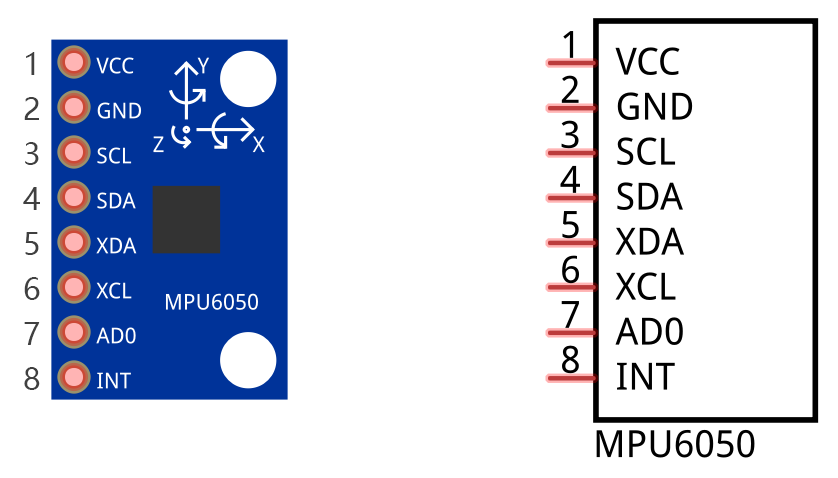
| Pin | Description |
|---|---|
| VCC | Power, 5V |
| GND | Ground |
| SCL | I2C clock |
| SDA | I2C data |
| XDA | Auxiliary I2C data (for chaining other I2C devices through the MPU6050) |
| XCL | Auxiliary I2C clock |
| AD0 | I2C address select — LOW = 0x68, HIGH = 0x69 |
| INT | Interrupt output |
The MPU6050’s I2C signal is sensitive to connection quality — make sure jumper wires are seated firmly, or readings may fail intermittently.
Component List
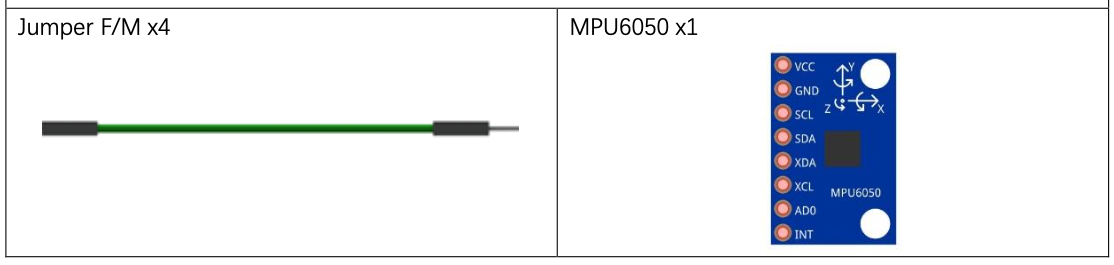
Circuit
The MPU6050 runs on 5V in this circuit, not 3.3V.
Wiring Diagram
Disconnect all power before building the circuit. Reconnect once verified.
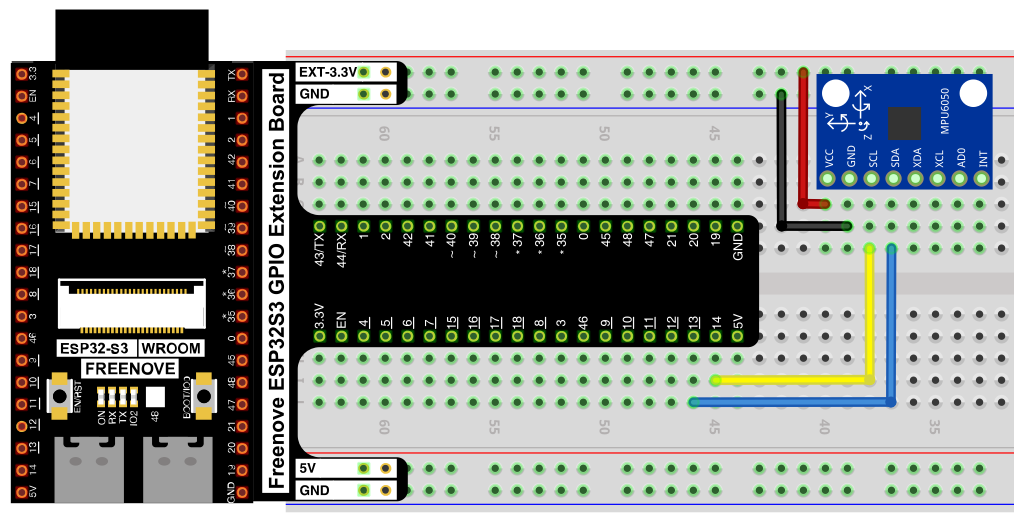
Connections:
- MPU6050 VCC → 5V
- MPU6050 GND → GND
- MPU6050 SCL → GPIO14
- MPU6050 SDA → GPIO13
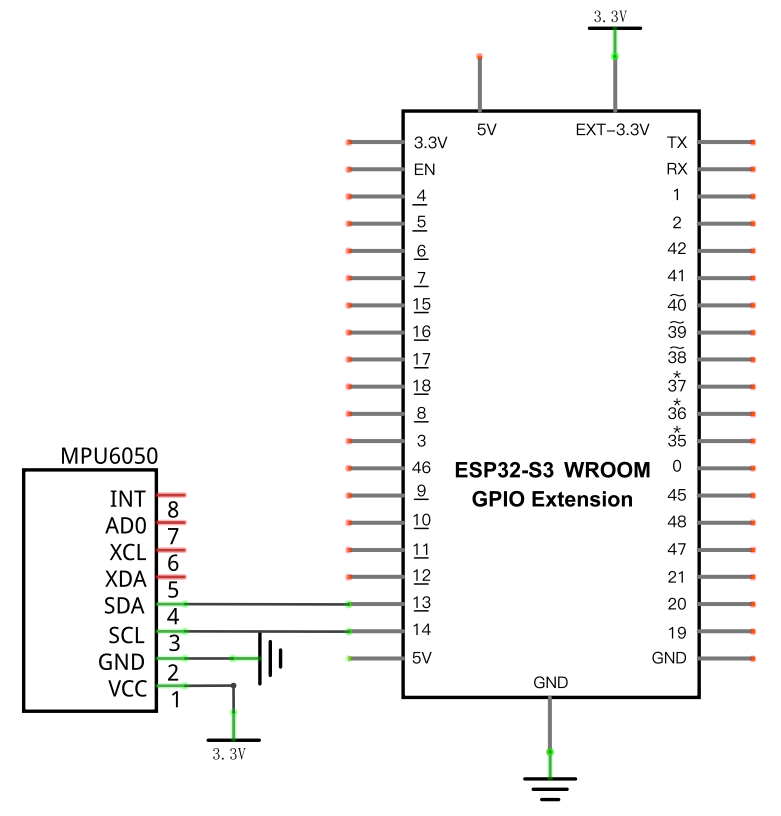
Schematic Diagram
Code
File: 03_sensors/code/Acceleration.py
Module: 03_sensors/code/mpu6050.py
from mpu6050 import MPU6050
import time

mpu=MPU6050(14,13) #attach the IIC pin(sclpin,sdapin)
mpu.MPU_Init()     #initialize the MPU6050
G = 9.8
time.sleep_ms(1000)#waiting for MPU6050 to work steadily

try:
    while True:
        accel=mpu.MPU_Get_Accelerometer()#gain the values of Acceleration
        gyro=mpu.MPU_Get_Gyroscope()     #gain the values of Gyroscope
        print("\na/g:\t")
        print(accel[0],"\t",accel[1],"\t",accel[2],"\t",
              gyro[0],"\t",gyro[1],"\t",gyro[2])
        print("a/g:\t")
        print(accel[0]/16384,"g",accel[1]/16384,"g",accel[2]/16384,"g",
              gyro[0]/131,"d/s",gyro[1]/131,"d/s",gyro[2]/131,"d/s")
        time.sleep_ms(1000)
except:
    pass
How to Run
Online
- Open Thonny →
03_sensors/code/. - Right-click
mpu6050.py→ Upload to / — wait for it to finish uploading to the ESP32-S3. - Double-click
Acceleration.py. - Click Run current script — raw and scaled acceleration/gyroscope data prints to the Shell once per second.
Code Explanation
Initialize the sensor
mpu=MPU6050(14,13) #attach the IIC pin(sclpin,sdapin)
mpu.MPU_Init()     #initialize the MPU6050
time.sleep_ms(1000)#waiting for MPU6050 to work steadily
Associates GPIO14 (SCL) and GPIO13 (SDA) with the MPU6050 over I2C, initializes its internal registers, then waits a second for readings to stabilize.
Read raw motion data
accel=mpu.MPU_Get_Accelerometer()#gain the values of Acceleration
gyro=mpu.MPU_Get_Gyroscope()     #gain the values of Gyroscope
Both return a 3-element list — one raw value per axis (X, Y, Z).
Scale raw values into real units
print(accel[0]/16384,"g",accel[1]/16384,"g",accel[2]/16384,"g",
      gyro[0]/131,"d/s",gyro[1]/131,"d/s",gyro[2]/131,"d/s")
The sensor outputs raw 16-bit numbers, not physical units. At the MPU6050’s default sensitivity settings, dividing the accelerometer’s raw value by 16384 converts it to g (multiples of gravity), and dividing the gyroscope’s raw value by 131 converts it to degrees/second. These divisors come from the sensor’s datasheet and depend on its configured sensitivity range.
Key Concepts
- I2C communication: a 2-wire bus (SCL clock + SDA data) that lets multiple devices share the same two pins, addressed individually (here,
0x68) - Raw sensor values vs. physical units: most digital sensors return integer register values that must be scaled by a sensitivity constant to get meaningful units — accelerometer and gyroscope axes often use different scale factors
- Sensitivity/scale factors:
16384LSB/g and131LSB/(°/s) are specific to the MPU6050’s default range settings; changing the sensor’s configured range would change these divisors
See Class mpu6050 for the full API reference.
Further Exploration
- Use the accelerometer’s Z-axis value to detect whether the board is lying flat or tilted.
- Combine X/Y accelerometer readings to estimate a tilt angle.
Adapted from Python_Tutorial.pdf Project 26.1