Introduction to Python and Microcontrollers
ESP32-S3 WROOM Setup — Linux
1. CH343 USB Driver
On most Linux distributions, the CH343 USB-to-serial driver is included in the kernel and loads automatically when the ESP32-S3 is connected. No manual driver installation is typically required.
Connect the microcontroller
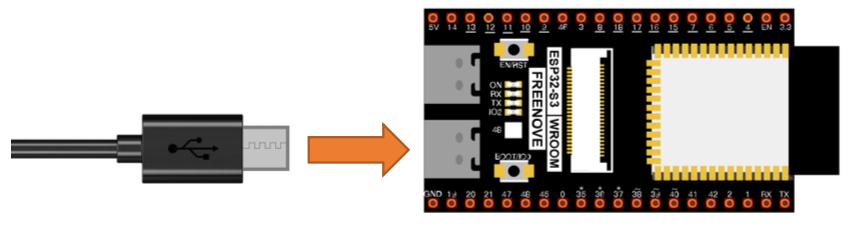
To verify the device is recognized after connecting via USB:
ls /dev/ttyUSB* /dev/ttyACM*
You should see a device such as /dev/ttyUSB0 or /dev/ttyACM0.
To ensure you have permissions to access the microcontroller, add your user to the dialout group then log out or restart:
sudo usermod -aG dialout $USER
Don’t forget to log out and back in for the change to take effect.
2. Install Thonny IDE
Thonny is the recommended Python IDE for programming the ESP32-S3 with MicroPython. Use the app store for your flavor of linux or Choose one of the command line installation methods below:
Recommended installer (installs a private Python 3.10 on x86_64):
bash <(wget -O - https://thonny.org/installer-for-linux)
pip (reuses your existing Python installation):
pip3 install thonny
Flatpak:
flatpak install org.thonny.Thonny
Debian / Ubuntu / Raspbian / Mint:
sudo apt install thonny
Fedora:
sudo dnf install thonny
3. Install Python 3
Python 3 is required to burn the MicroPython firmware. Most Linux distributions include it by default.
Check if it’s installed:
python3 --version
If not, install it via your package manager, e.g.:
sudo apt install python3       # Debian/Ubuntu
sudo dnf install python3       # Fedora
Or download from: https://www.python.org/downloads/
4. Flash MicroPython Firmware
The ESP32-S3 needs MicroPython firmware flashed onto it before you can run Python programs.
The firmware is located in setup/Python_Firmware/ESP32_GENERIC_S3-SPIRAM_OCT-20250809-v1.26.0.bin
Flash the firmware:
- Connect the ESP32-S3 WROOM to your computer via USB cable.
- Open a terminal in the
Python_Firmwarefolder:cd ~/python_microcontrollers/setup/Python_Firmware - Run the firmware script (same script as macOS):
python3 linux.py - Wait for the firmware to finish burning. A completion message will appear when done.
5. Configure Thonny
- Open Thonny.
- Go to View → enable Files and Shell.
- Go to Run → Configure interpreter.
- Set the interpreter to MicroPython (ESP32).
- Set the port to your serial device (e.g.,
/dev/ttyUSB0or/dev/ttyACM0). - Click OK.
6. Test the Connection
In the Shell panel at the bottom of Thonny, type:
print('hello world')
Press Enter. If hello world is printed back, the connection is working correctly.
7. Running Code
Run Online (while connected to PC)
- In Thonny, click Open… → This computer.
- Navigate to 01_first_examples/code/HelloWorld.py
- Click Run current script (green play button).
Note: If you press the reset button on the ESP32-S3 while running online, the code will not restart automatically.