Introduction to Python and Microcontrollers
ESP32-S3 WROOM Setup — macOS
1. Install the CH343 USB Driver
The ESP32-S3 WROOM uses the CH343 chip for USB-to-serial communication. You must install its driver before your Mac can communicate with the board.
- Unzip the driver CH34XSER_MAC.ZIP
- If using MacOS 11 or higher open
CH34xVCPDriver.dmgIf using an older version of MacOS ask for help
- Allow applications from
App Store & Known DevelopersGo to System Settings -> Privacy & Security then scroll down to find setting

- Drag the
CH34xVCPDriverapplication to the Applications folder - Go to the
Applicationsfolder and open the appClick
Openwhen asked if you want to open the app - Click the
Installbutton in the app windowClick
OKwhen asked if you want to install a new driver extension - Enable Driver Extension in System Settings
- Go to System Settings -> General -> Login Items & Extensions
- Click the
 next to
 CH34xVCPDriver - Click the slider and enter your password when prompted
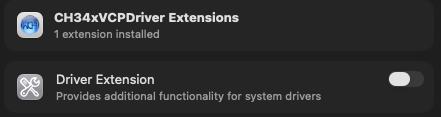
- Click Done
2. Install Thonny IDE
Thonny is the recommended Python IDE for programming the ESP32-S3 with MicroPython.
- Download the installer: https://github.com/thonny/thonny/releases/download/v5.0.0/thonny-5.0.0-x64.pkg
- Double-click the
.pkgfile and follow the installation prompts. - Once installed, open Thonny from your Applications folder
3. Flash MicroPython Firmware
The ESP32-S3 needs MicroPython firmware flashed onto it before you can run Python programs.
The firmware is located in setup/Python_Firmware/ESP32_GENERIC_S3-SPIRAM_OCT-20250809-v1.26.0.bin
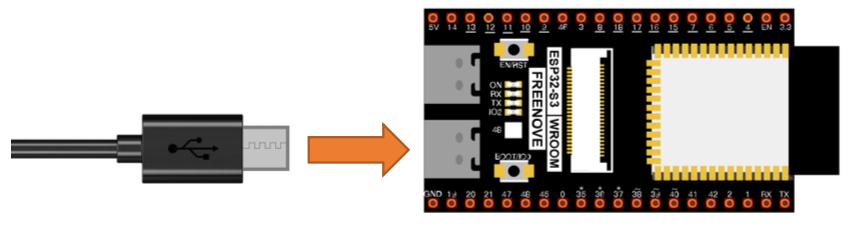
Flash the firmware:
- Connect the ESP32-S3 WROOM to your Mac via USB cable.
- Use the right hand USB3 connection on the microcontroller
- If the blue light is blinking when connected press the reset (RST) button
- Open Finder and navigate to
setupfolder. - Right-click the
Python_Firmwarefolder and select New Terminal at Folder. - In the Terminal, run:
python3 mac.py - Wait for the firmware to finish burning. A completion message will appear when done.
4. Configure Thonny
- Open Thonny.
- Go to View → enable Files and Shell.
- Go to Run → Configure interpreter.
- Set the interpreter to MicroPython (ESP32).
- Set the port to the USB serial port for the ESP32-S3 (it will appear as something like
/dev/cu.usbserial-XXXXor/dev/cu.wchusbserial-XXXX). - Click OK.
- Press
Stopsign to reset
6. Test the Connection
In the Shell panel at the bottom of Thonny, type:
print('hello world')
Press Enter. If hello world is printed back, the connection is working correctly.
7. Running Code
Run Online (while connected to Mac)
- In Thonny, click Open… → This computer.
- Navigate to 01_first_examples/code/HelloWorld.py
- Click Run current script (green play button).
Note: If you press the reset button on the ESP32-S3 while running online, the code will not restart automatically.