Introduction to Python and Microcontrollers
Hygrothermograph (DHT11)
Read temperature and humidity from a DHT11 sensor and print both to the Shell.
New Concepts
- DHT11
DHT11
The DHT11 is a combined temperature and humidity sensor whose output is already calibrated by the manufacturer — no formulas or lookup tables needed, unlike the Thermistor. It uses a custom single-wire protocol to send data, so reading it relies on the dht driver module rather than a plain GPIO read.
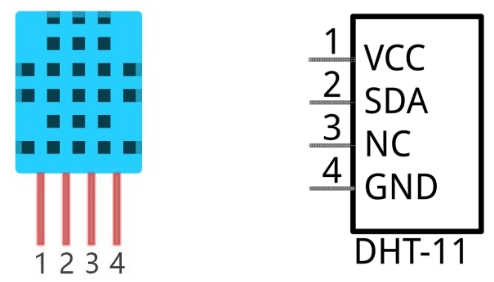
| Pin | Description |
|---|---|
| VCC | Power, 3.3V–5.5V |
| SDA | Data pin — single-wire communication |
| NC | Not connected — has no function and should be left unwired |
| GND | Ground |
The sensor takes about 1 second to initialize after power-up.
Component List
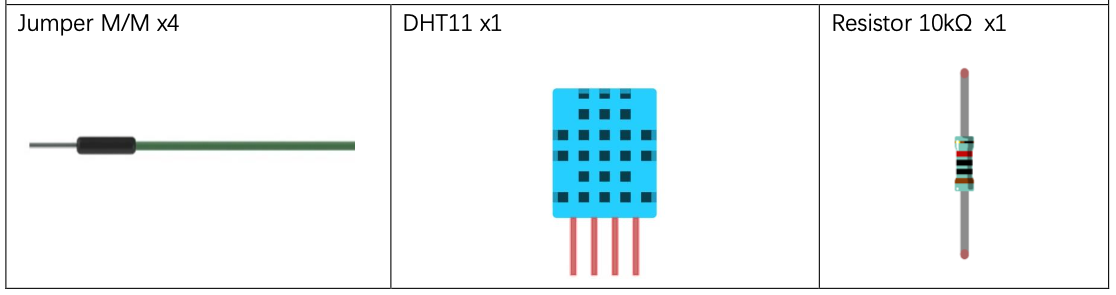
Circuit
Disconnect all power before building the circuit. Reconnect once verified.
Wiring Diagram
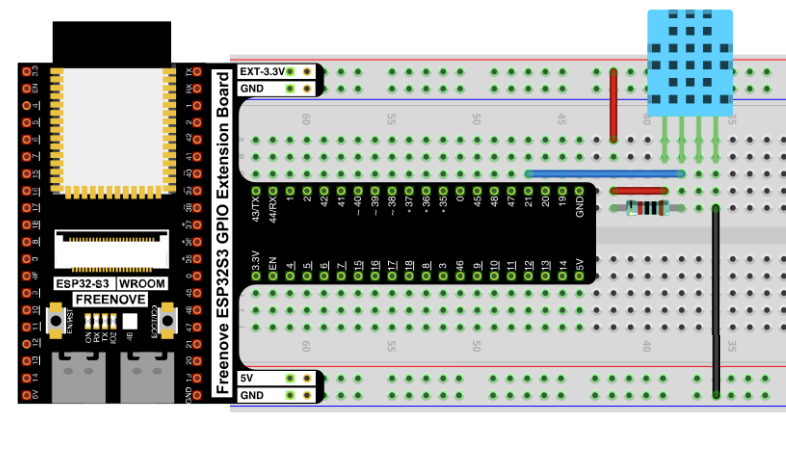
Connections:
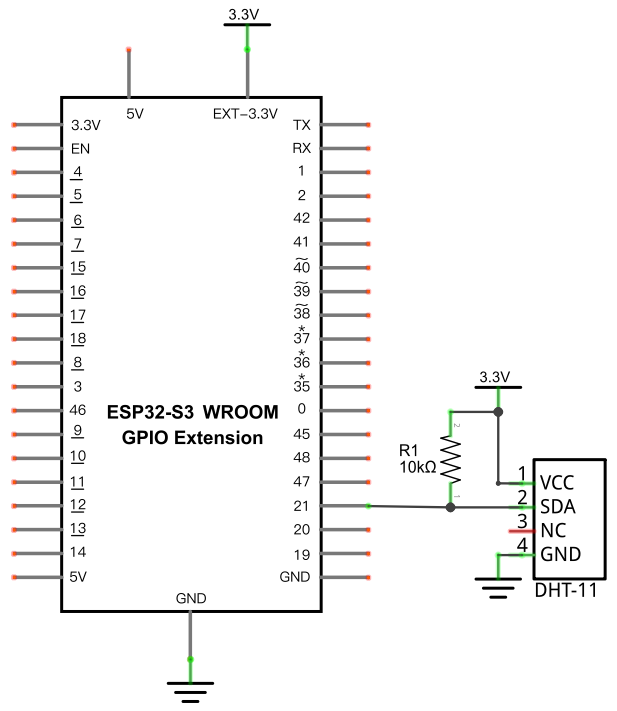
- DHT11 VCC → 3.3V (through a 10kΩ pull-up to the SDA line)
- DHT11 SDA → GPIO21
- DHT11 NC → not connected
- DHT11 GND → GND
Schematic Diagram
Code
File: 03_sensors/code/Hygrothermograph.py
import machine
import time
import dht

DHT = dht.DHT11(machine.Pin(21))

while True:
    try:
        DHT.measure()
        print('temperature:',DHT.temperature(),'humidity:',DHT.humidity())
        time.sleep_ms(2000)
    except:
        pass
How to Run
Online
- Open Thonny →
03_sensors/code/. - Double-click
Hygrothermograph.py. - Click Run current script — temperature and humidity print to the Shell every 2 seconds.
Code Explanation
Associate the sensor with a pin
DHT = dht.DHT11(machine.Pin(21))
Creates a DHT11 object on GPIO21, the pin wired to the sensor’s SDA line.
Take a reading
DHT.measure()
print('temperature:',DHT.temperature(),'humidity:',DHT.humidity())
measure() triggers a fresh reading over the single-wire protocol; temperature() and humidity() then return the two values from that reading.
Wrap in try/except
while True:
    try:
        DHT.measure()
        ...
    except:
        pass
DHT11 reads occasionally fail (the single-wire timing is sensitive to interference). Wrapping each attempt in try/except means one failed read is silently skipped instead of crashing the loop.
Key Concepts
- Single-wire protocols: some sensors send all their data over one data pin with precise timing, rather than a standard bus like I2C or UART — these require a dedicated driver module instead of plain GPIO reads
- Calibrated sensors: the DHT11 returns ready-to-use temperature/humidity values directly, unlike the Thermistor, which needs a manual formula to convert resistance into temperature
See Class dht for the full API reference.
Further Exploration
- Average several readings to smooth out occasional bad samples.
- Combine this with Soft Light’s PWM technique to drive a fan or heater indicator based on temperature.
Adapted from Python_Tutorial.pdf Project 24.1