Introduction to Python and Microcontrollers
Hygrothermograph (DHT11 + LCD1602)
Combine the DHT11 and LCD1602 projects: read temperature and humidity, and display both directly on the LCD instead of just printing to the Shell.
New Concepts
- Combining a sensor input project with a display output project
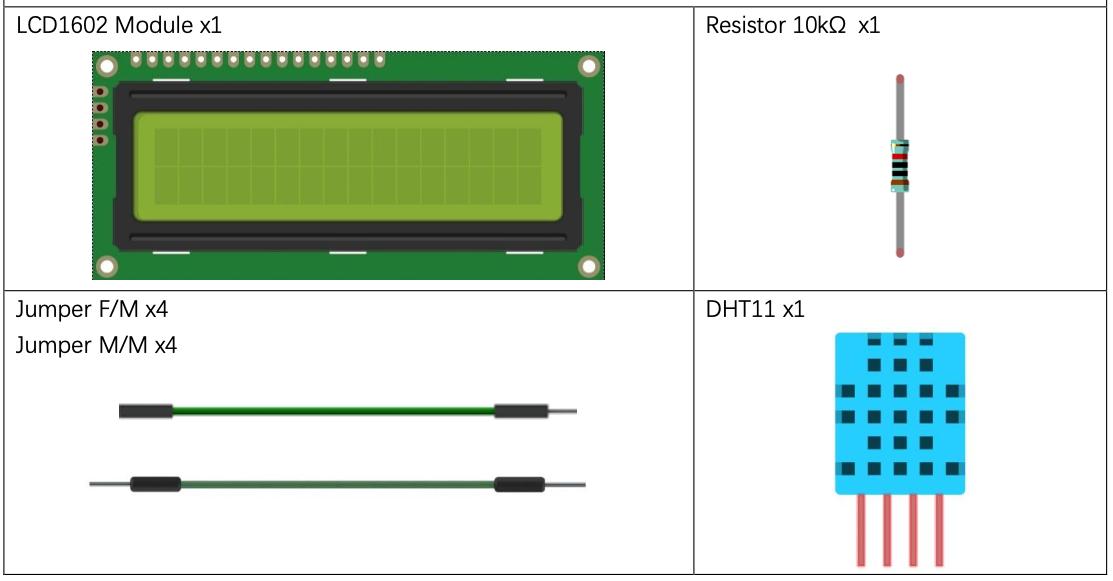
Component List
Circuit
Wiring Diagram
Disconnect all power before building the circuit. Reconnect once verified.
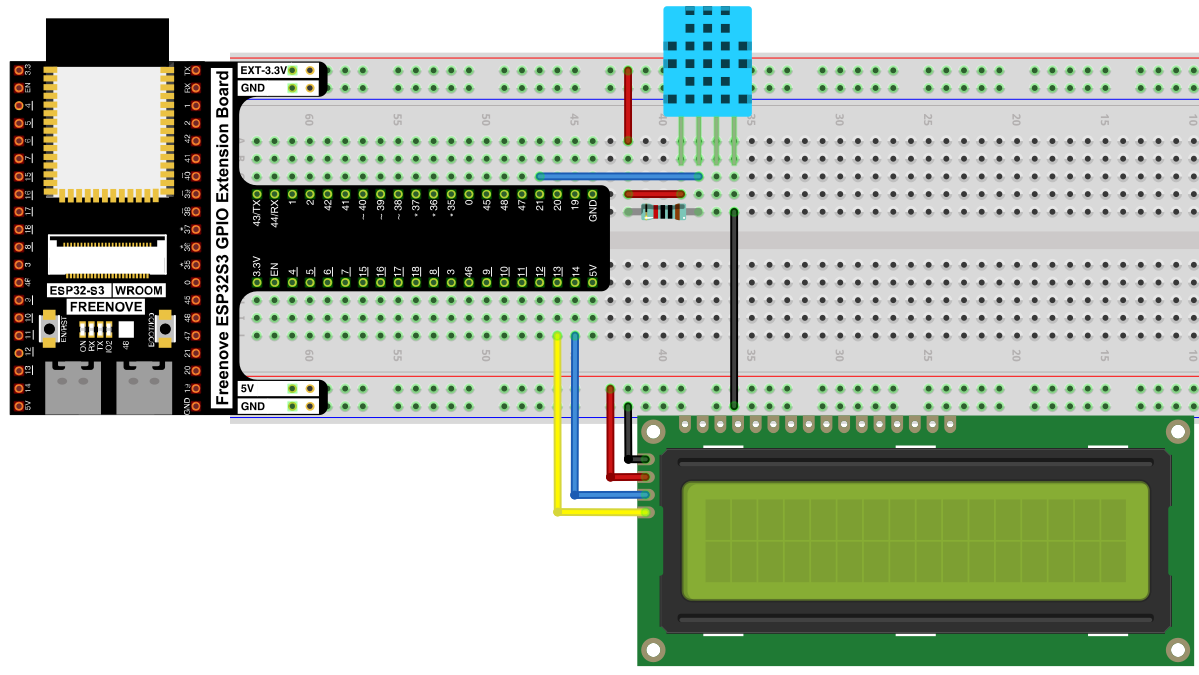
Connections:
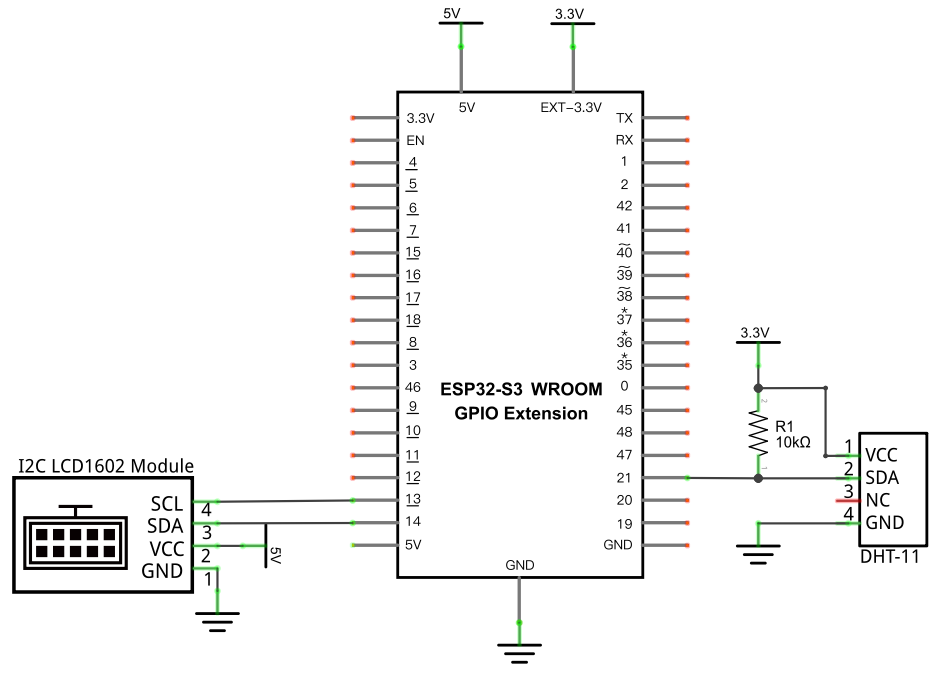
- DHT11 SDA → GPIO21 (with a 10kΩ pull-up to 3.3V)
- LCD1602 SCL → GPIO13, SDA → GPIO14
Schematic Diagram
Code
File: 04_output/code/Hygrothermograph.py
Modules: 04_output/code/I2C_LCD.py, 04_output/code/LCD_API.py
from time import sleep_ms
from machine import I2C, Pin
from I2C_LCD import I2cLcd
import dht

DHT = dht.DHT11(Pin(21))
i2c = I2C(scl=Pin(13), sda=Pin(14), freq=400000)
devices = i2c.scan()
if len(devices) == 0:
    print("No i2c device !")
else:
    for device in devices:
        print("I2C addr: "+hex(device))
        lcd = I2cLcd(i2c, device, 2, 16)

try:
    while True:
        DHT.measure()
        lcd.move_to(0, 0)
        lcd.putstr("Temperature: ")
        lcd.putstr(str(DHT.temperature()))
        lcd.move_to(0, 1)
        lcd.putstr("Humidity: ")
        lcd.putstr(str(DHT.humidity()))
        sleep_ms(2000)
except:
    pass
How to Run
Online
- Open Thonny →
04_output/code/. - Right-click
I2C_LCD.pyandLCD_API.py→ Upload to / if they aren’t already on the device. - Double-click
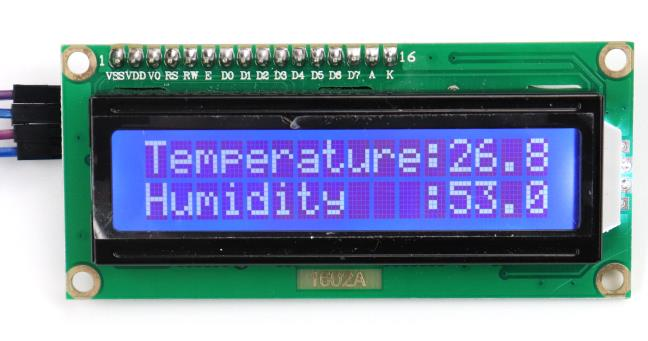
Hygrothermograph.py. - Click Run current script — temperature appears on row 1 and humidity on row 2, updating every 2 seconds.
Code Explanation
This project is a direct merge of two earlier ones — nothing here is new on its own:
DHT = dht.DHT11(Pin(21))
i2c = I2C(scl=Pin(13), sda=Pin(14), freq=400000)
Sets up the DHT11 exactly as in Hygrothermograph, and the I2C bus exactly as in LCD1602.
DHT.measure()
lcd.move_to(0, 0)
lcd.putstr("Temperature: ")
lcd.putstr(str(DHT.temperature()))
lcd.move_to(0, 1)
lcd.putstr("Humidity: ")
lcd.putstr(str(DHT.humidity()))
Takes a fresh DHT11 reading, then writes labeled values to each LCD row. str() converts the numeric sensor readings into text putstr() can print — without it, putstr() would error trying to write a number directly.
Key Concepts
- Combining independent projects: most “new” projects in this kit are really two earlier projects’ code pasted together with minimal changes — recognizing the reusable pieces (sensor setup, display setup) makes new combinations fast to build
str()beforeputstr(): display and print functions generally expect strings — numeric sensor values need explicit conversion first
See Class dht and Class I2cLcd for the full API references.
Further Exploration
- Add a third reading (e.g. from the Thermometer’s thermistor) and cycle between display pages every few seconds.
- Use
lcd.clear()before each update if old digits linger when a new reading has fewer characters.
Adapted from Python_Tutorial.pdf Project 24.2